The USGA Green Section is pleased to announce our latest update to the DEACON management system launched on Tuesday, October 21, 2025. DEACON R29 includes major updates for moisture maps, organic matter widgets, and more. Here is a summary of the updates:
Introducing Mobile Moisture Maps
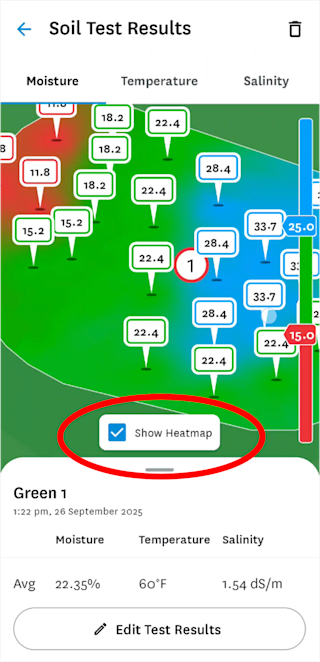
R27 introduced moisture maps on the DEACON web platform and R29 brings it to the mobile app. Users can access it by navigating to Calendar → Soil Test and selecting the heatmap checkbox. Wet and dry areas are shown based on inputted targeted ranges. This release also includes an updated legend and improved visual clustering showing the ranges of the moisture readings.
Introducing Organic Matter (OM246) Widgets
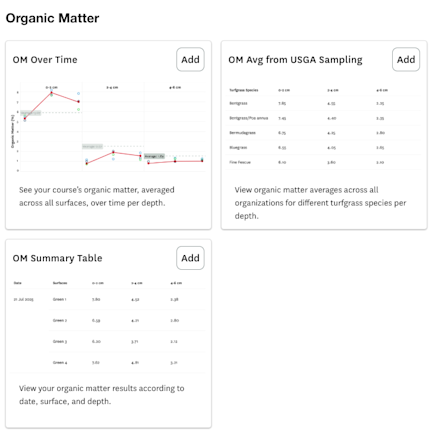
R29 adds detailed OM246 organic matter testing data to the DEACON web platform. To use these widgets, turfgrass species must be entered. The widgets, available under Organic Matter in Add Widget, include a summary table, comparative results table by turfgrass species, and a percentile-based visualization. Organic matter results are entered by the USGA when you go through a Course Consulting Visit, or customers can manually enter organic matter by going to Calendar -> Add New -> Add Metric.
Introducing Tine Length Filtering
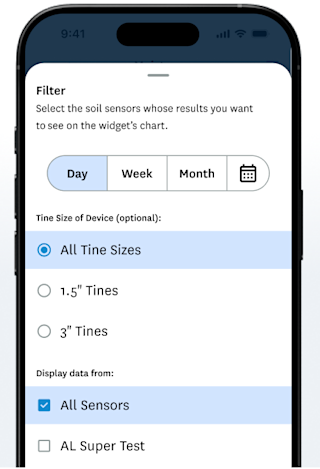
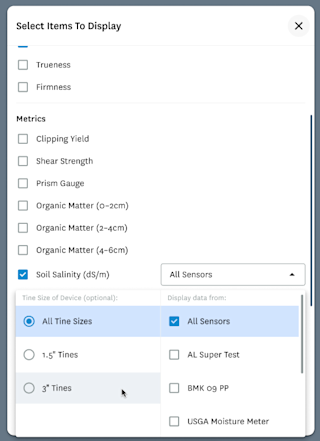
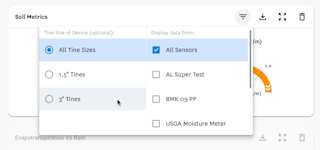
Beginning in R28, DEACON started recording the tine length used in USGA Moisture Meter soil tests. With R29, you can now filter results by tine length within the Soil Widget (mobile and web) and Custom Chart (web only.)
Mobile:
Web:
Deleting Completed Test Measurements without Reconnecting
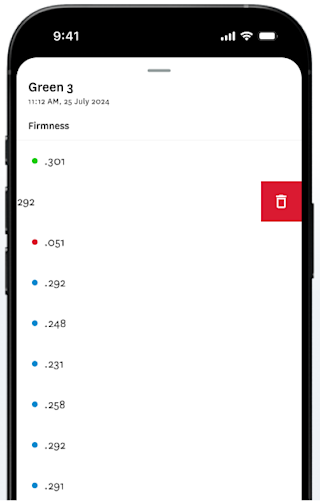
Previously, overriding a measurement in a completed test required the user to reconnect to the GS3 ball. Based on customer feedback, users can now edit past results, like outliers, directly from the Calendar without reconnecting to the ball.
We encourage you to discover all the changes in DEACON R29. Please contact greensection@usga.org with any questions or comments.